How to Play with a Click Track Live: A Guide for Bands and Worship Teams
Every band rushes the chorus and drags the bridge — until someone in the room is listening to a click. Here's how to get your band comfortable on a click track without it feeling like a cage.
Play back a recording of your last set and you'll probably hear it: the first verse sits at 72 BPM, the last chorus lands near 80. Nobody decided to speed up — adrenaline pushes tempo, loud sections pull everyone forward, quiet sections sag. A click track fixes this not by policing the band, but by giving everyone the same shared reference for time. Here's how to actually play with one live, whether you're a bar band or a Sunday worship team.
Who hears the click? Start with the drummer
The biggest misconception about playing to a click is that everyone needs it in their ears. They don't. The drummer hears the click; the band hears the drummer. If your drummer locks to the click, everyone downstream of the kick and hi-hat is on tempo automatically. Start there and you can have a click-tight band this week, even if only one person owns in-ears.
Practically, that means routing the click to the drummer's in-ear monitors (or headphones, day one) and keeping it out of the front-of-house mix. If your music director or keys player wants it too, add them next — but never send the click anywhere the audience can hear it. If your board is short on aux sends, the classic budget routing is a stereo feed with click panned hard to one side and music to the other.
Count-offs: how songs actually start on a click
Starting together is where most bands fall apart, because someone counts off a tempo from memory and it's 8 BPM hot. On a click, the song starts with a count-off: a bar or two of click before the downbeat, at the exact programmed tempo. The drummer hears it in their ears, cues the band with sticks or a nod, and everyone enters at the right speed — the same speed you rehearsed.
Rehearsal drills to get comfortable on click
A band that has never played to a click will fight it for the first two rehearsals. That's normal. These drills shorten the adjustment:
-
Drummer alone first. Ten minutes of just kick, snare and click before the band arrives. The goal is to make the click "disappear" — when you're perfectly locked, you stop hearing it, because your hits mask it.
-
One song, whole rehearsal. Don't put the entire set on click at once. Pick your most tempo-stable song and run it until it feels boring. Boring is the goal.
-
Mute-and-return. Have the drummer play 8 bars with click, 8 bars with it muted, then bring it back. If the click returns and you're still on it, you're internalizing tempo instead of chasing it.
-
Rehearse the count-offs, not just the songs. Practice every song's entrance three times in a row. Entrances are 80% of what the audience notices.
Common mistakes (and the fixes)
-
Click too loud. If it dominates the drummer's ears, they play stiff and behind the beat. The click should sit just above the music — audible, not oppressive.
-
Click too quiet. The opposite failure: the drummer loses it in loud sections exactly when tempo drift is most likely. Set the level during the loudest chorus, not during soundcheck silence.
-
Wrong click sound. A soft woodblock disappears under cymbals; a sharp, percussive tick cuts through. Pick a sound that doesn't live in the same frequency range as your kit.
-
Wrong subdivision. Quarter notes work for most songs, but slow ballads (under ~70 BPM) feel steadier with an eighth-note click so there's less dead air between beats.
-
Guessing the tempo live. If the BPM isn't written down and programmed per song, you're not really on a click — you're on a metronome someone eyeballed.
Tip: The click is a reference, not a metronome test. If the band drifts a hair ahead for a phrase, don't slam the brakes — ease back over a bar or two. Smooth corrections are invisible; sudden ones sound like a mistake.
Doing it in LiveTrackz: a click track app built for the stage
You can run all of the above from a hardware metronome, but the moment you have a full set of songs at different tempos, you want the click programmed per song. That's exactly what LiveTrackz does — it's a metronome with a setlist, so every song carries its own BPM and time signature.
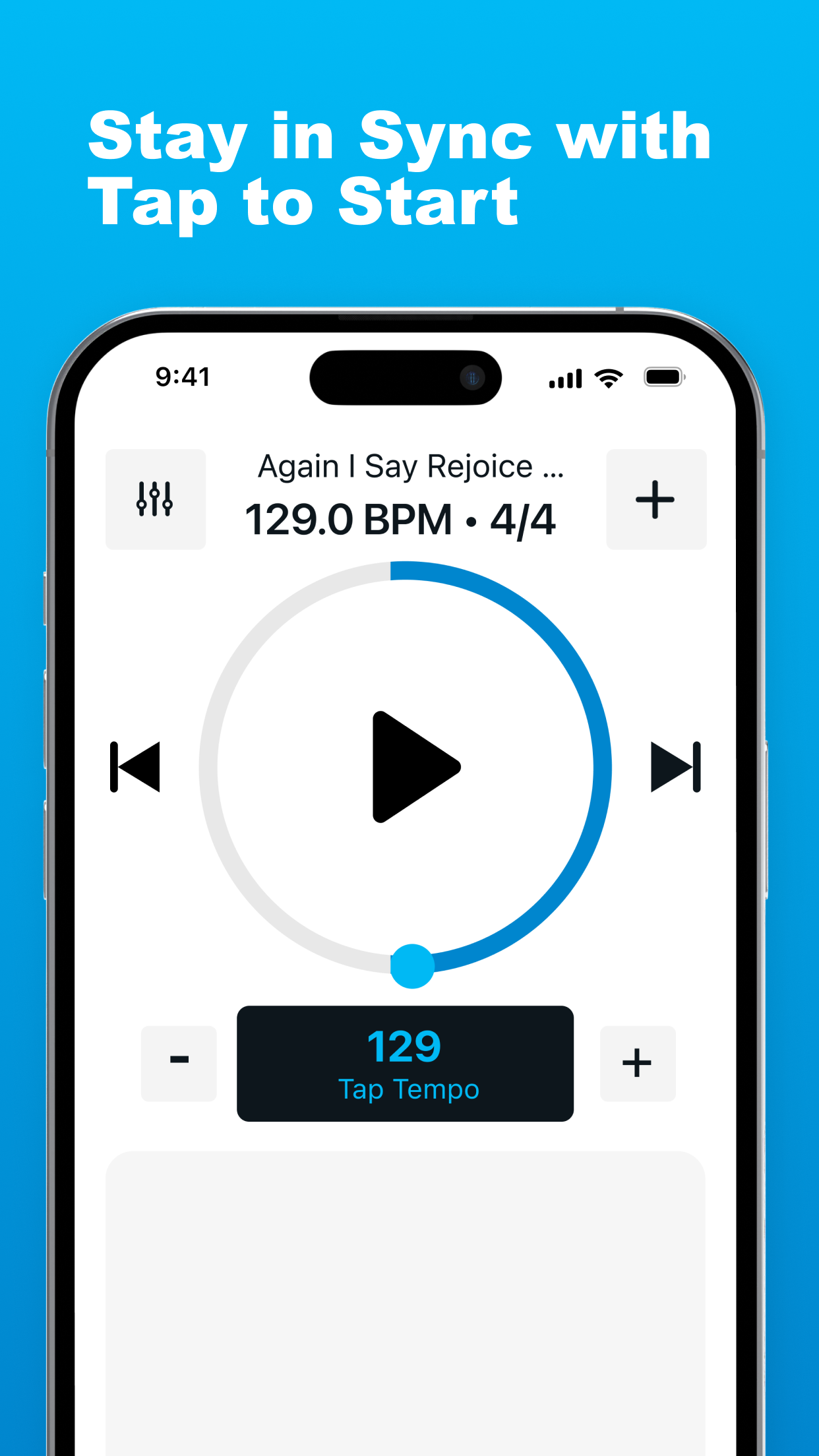
The LiveTrackz player: 129.0 BPM, 4/4, tap tempo, and tap-to-start — one tap counts the band in.
1. Program each song's tempo once
Build your setlist and save the BPM and time signature per song. Not sure of a tempo? Use tap tempo — tap along to the recording and the app reads the BPM for you. From then on, that song starts at that tempo every single time.
2. Tap to start, count-off included
On stage, the drummer opens the song — say 129.0 BPM in 4/4 — and taps to start. The count-off comes in at exactly the programmed tempo, the band enters together, and the app stays a reliable timing reference for the whole song. No guessing, no "was this one faster last week?"
3. Move through the set without touching a laptop
Prev/next song controls sit right on the player, so between songs it's one tap to load the next tune at its own tempo and time signature. And when your team is ready to go beyond a bare click, the same setlist can carry full backing tracks — percussion, pads and loops with the click built in. See our guide to running backing tracks in live worship for that next step.
What you need to get started
-
An iPhone or iPad (iOS 15+) with LiveTrackz installed
-
In-ears or headphones for the drummer (wired is the safe choice on stage)
-
A feed from the phone to the drummer's ears — direct on day one, through the monitor mix once you're settled
-
Ten minutes to build a setlist with each song's BPM and time signature
-
One song this week played entirely on click — then grow from there
Put your whole set on click this week
LiveTrackz saves BPM and time signature per song, counts the band in with tap-to-start, and keeps everyone in sync — free to download on the App Store.