A Metronome with Setlists: Save the BPM for Every Song You Play
Yes — you can pre-program tempo and time signature for every song in your set, then start each one at the exact BPM with a single tap. Here's how, and why a plain metronome falls apart on stage.
Short answer to the question that brought you here: yes, a metronome can save the BPM for each song. The tool you want is a metronome with setlists — you enter every song's tempo and time signature once, in order, and on the night you just step through the list. No dial spinning, no "wait, was it 76 or 82?" while the room waits on you.
Why a plain metronome fails on stage
A standard metronome app does one tempo at a time, and that's exactly the problem. Between songs you're re-dialing: find the BPM in your notes (or your memory), scroll or type it in, double-check it, then count the band in. That's a 15–30 second dead spot after every song, and it's the moment mistakes happen. Under stage pressure, tempos you've played a hundred times evaporate — you set 92 when it should have been 84, the band locks to it, and now the whole song feels rushed and nobody can say why.
Time signatures make it worse. Most sets aren't wall-to-wall 4/4. Worship sets in particular love the 6/8 ballad — "How Great Is Our God" style builds, slow gospel waltzes — and if your metronome is still clicking quarter notes in 4/4 while the band feels it in 6/8, the click is fighting the music instead of holding it together. A per-song setup means the 6/8 song opens already subdivided correctly, not after you've fumbled through a settings menu mid-set.
First: find the real BPM of each song
Before you can save tempos, you need accurate ones. Three reliable ways:
-
Tap tempo. Play the original recording and tap along on a tap-tempo button for eight or more beats. Most apps average your taps into a BPM. Tap on the backbeat if the groove makes the downbeat ambiguous.
-
Check the recording you actually play to. The studio version, the live version and your church's arrangement can all sit at different tempos. Measure the version your band imitates, not the first result on a lyrics site.
-
Trust your drummer's ear, then verify. If the song always "feels right" at rehearsal, tap along to a rehearsal recording and lock in that number rather than the album's.
Then write the tempos into your set — literally. Even a paper setlist should read "Song — 84 BPM — 6/8 — key of F." Once every song has a number next to it, you've done the hard part; a setlist metronome just makes those numbers executable.
Doing it in LiveTrackz: a setlist where every song remembers its tempo
LiveTrackz is built around exactly this workflow. Every song in a setlist stores its BPM, time signature and key together, so the list you rehearse from is the list you perform from.
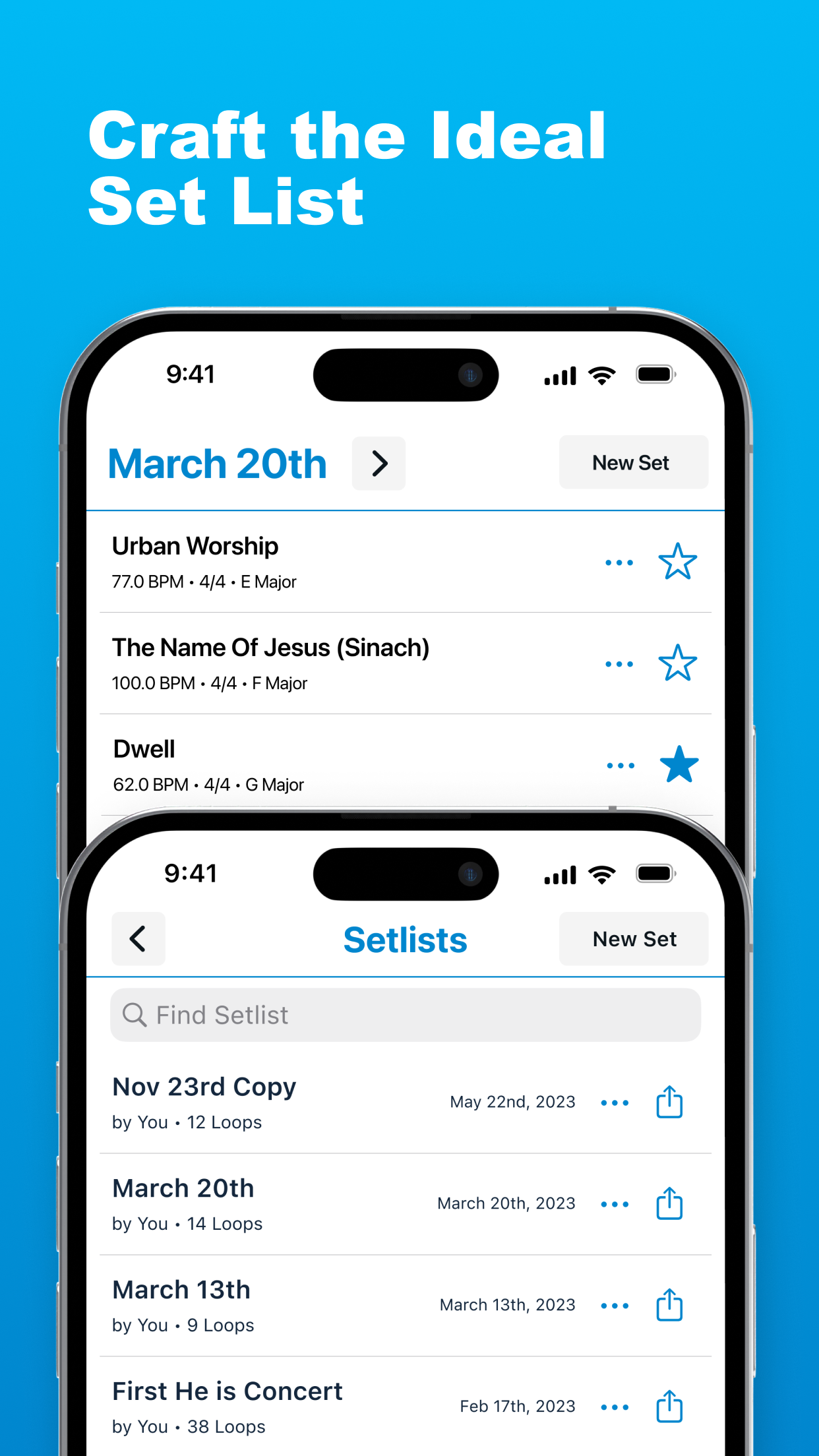
A LiveTrackz setlist: each song carries its own BPM, time signature and key (E Major, F Major, G Major).
1. Build the set, one song at a time
Create a setlist for the date, add your songs in order, and give each one its tempo, time signature and key. Not sure of a BPM? Use tap tempo right in the player — tap along with the recording and capture the number on the spot.
2. Tap to start — the count-off is the programmed tempo
On stage, open the set and tap to start. The count-off brings the band in at exactly the BPM you saved — not the tempo you nervously dialed ten seconds ago. If your band is new to playing with a click, read our guide to playing with a click track live first; the routing and in-ear setup is the same.
3. Move through the set with prev/next
Between songs, the previous/next controls load the next song with its own tempo, time signature and key already set. The 6/8 ballad after the 128 BPM opener is one tap away, clicking correctly from beat one.
4. When you're ready, the click becomes a track
Because LiveTrackz is also a loop player, the same setlist slot that holds a bare click can hold a full backing track — percussion, pads, the works — from its 3000+ loop library. Start with just the metronome, and grow into loops song by song without changing your workflow. Setlists can also be shared with your whole team via an invite link, so everyone rehearses to the same tempos and keys.
Tip: Save tempos at rehearsal, not at soundcheck. Rooms feel different when they're full, and a tempo you "adjust by feel" on the night is usually a tempo you rush. Trust the number you locked in when heads were cool.
Getting started
-
Install LiveTrackz on an iPhone or iPad (iOS 15+)
-
Create a setlist for your next gig or service
-
Add each song with its BPM, time signature and key — use tap tempo against the recordings for any you're unsure of
-
At rehearsal, run the whole set with tap-to-start and prev/next, exactly as you will on the night
One rehearsal is enough to feel the difference: the gaps between songs shrink, tempos stop drifting week to week, and nobody has to hold a BPM in their head under pressure again.
Program your whole set's tempos tonight
LiveTrackz saves BPM, time signature and key per song, counts the band in with tap-to-start, and grows from click to full backing tracks when you're ready.