Custom Backing Tracks: How to Get a Loop Made for Any Song
The song your team is singing Sunday isn't in MultiTracks, Loop Community, or anywhere else. Here are your real options — including how to just request a loop and have it made for you.
Every worship team hits this wall eventually: the pastor requests a song, you search every backing track library you know, and it's simply not there. No stems, no loop, no click file. If your band has learned to lean on tracks, "we don't have it" isn't a great answer on a Wednesday before Sunday. So what are your actual options?
The usual options when a song isn't in any library
Build the stems yourself in a DAW
If you (or someone on your team) knows Logic, Ableton or GarageBand, you can program the percussion, lay down a pad, add a click and bounce your own backing track. It works — and you get exactly what you want — but budget several hours per song: transcribing the groove, programming parts that don't sound robotic, mixing, and exporting stems with a synced click. For a music director juggling rehearsal, charts and a day job, that's rarely sustainable for more than the occasional song.
Commission a producer
You can hire a producer or tracks studio to build a custom multitrack for you. The results are usually excellent, but one-off custom production commonly runs well into the tens or hundreds of dollars per song, with turnaround measured in weeks. That math only works for a song you'll sing for years.
Play it without tracks
A completely valid choice — bands played live long before playback rigs existed. But if the rest of your set runs on loops and a click, the one song without them tends to stick out: the drummer loses the tempo reference, the transitions loosen up, and the percussion layers your congregation is used to disappear.
Why so many songs are missing from the big libraries
The major stem libraries are built around the mainstream US worship catalog — the CCLI Top 100 gets covered within weeks. What routinely falls through the cracks:
-
Regional and international gospel: Nigerian and other African worship, Caribbean gospel, and songs by artists whose catalogs live on YouTube rather than on licensing platforms.
-
Newer and independent gospel releases: a song can be everywhere in your community months before any library picks it up — if it ever does.
-
Medleys and arrangements: praise breaks, medleys and church-specific arrangements are by definition custom. No library stocks your version of a three-song flow.
If your church sings urban worship, amapiano praise or classic choir repertoire, you've probably felt this gap more than most — it's the same gap we cover in our guide to drum loops for gospel songs.
The fourth option: request a loop and have it made for you
In LiveTrackz, a missing song isn't a dead end — it's a form. The app has a built-in Request New Loop flow, and loop requests are free for all subscribers. Here's how it works:
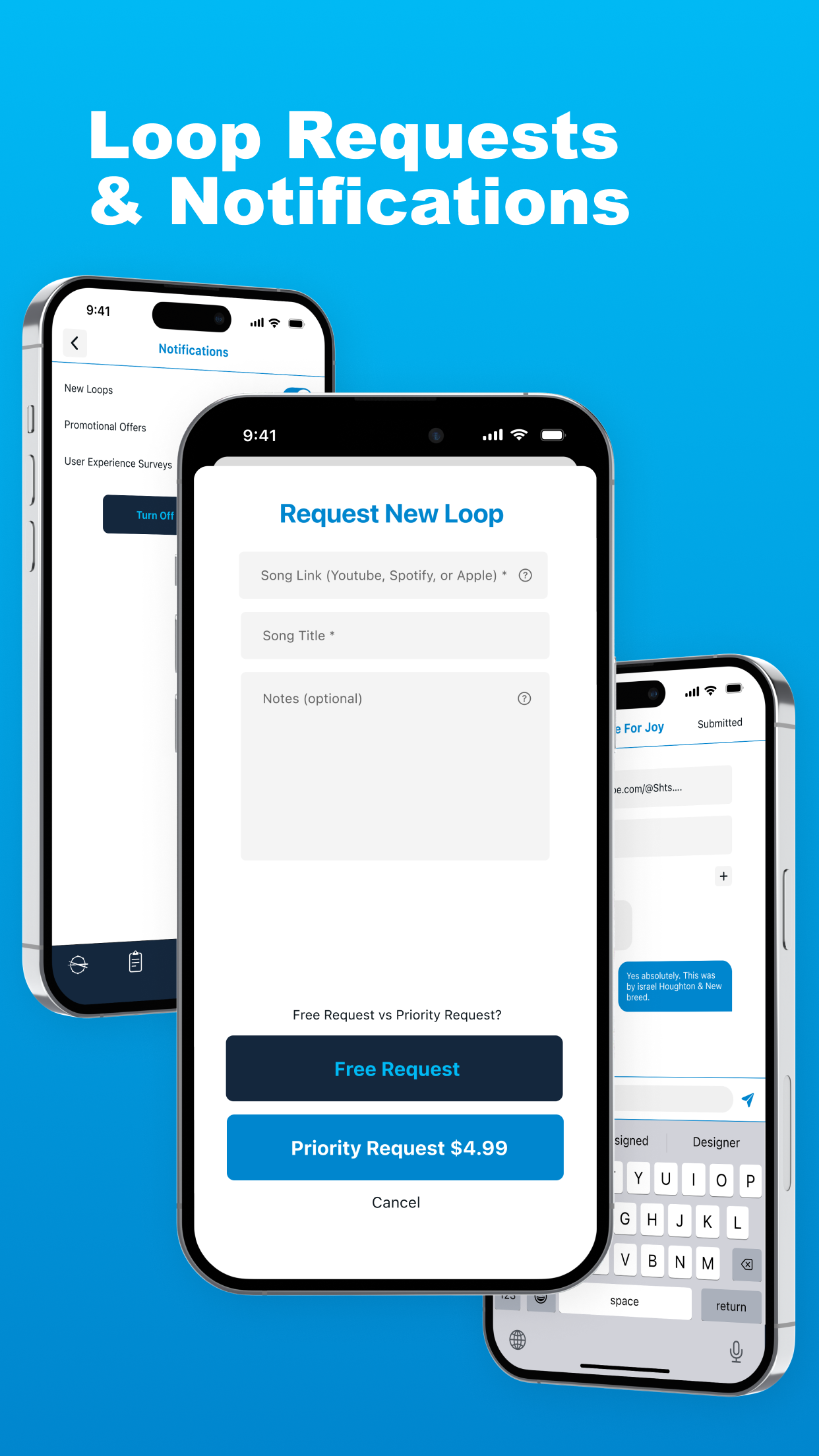
The Request New Loop form: paste a song link, add notes, choose Free or Priority.
1. Paste a link to the song
Open the Request New Loop form and paste a link from YouTube, Spotify or Apple Music. The link matters more than the title — it tells the loop makers exactly which recording, tempo and arrangement you mean.
2. Add the title and your notes
Give the song title and describe what you need: the tempo you sing it at, which section matters most, which percussion elements you want under the groove.
3. Choose Free or Priority
Standard requests are included with your subscription at no extra cost. If Sunday is close and you need it fast, there's a Priority Request option at $4.99 that moves your song to the front of the queue.
4. Get notified and play it like any other loop
You get a notification when your loop is ready. It lands in your library tagged with BPM, key and time signature, with the same full multitrack control as every other loop — level the click for your drummer, pull back the shakers, mute what your live players already cover, and drop it straight into your setlist.
Because requests are bundled into the flat subscription, the cost comparison with per-song stem stores gets lopsided fast — we break that down in our MultiTracks alternative guide.
How to write a request that comes back right
-
Link the exact version. Live version vs. studio version vs. a cover can differ in key, tempo and structure. Link the one your team actually plays.
-
Note your tempo. If you sing it slower or faster than the recording, say so — a loop at the wrong BPM is a loop you'll fight all service.
-
Call out the percussion that matters. If the congas in the vamp or the shaker in the bridge are the reason you want the track, mention them by name so they get their own channels in the mix.
Tip: Submit requests as soon as a song enters your planning conversation, not the week you're singing it. Free requests cost you nothing, so there's no reason to wait — and you'll rarely need to pay for Priority.
Getting started
-
Download LiveTrackz on your iPhone or iPad (iOS 15+)
-
Search the 3000+ loop library first — your song may already be there
-
If it's missing, submit a free Request New Loop with a YouTube, Spotify or Apple Music link and your notes
-
Watch for the notification, mix the loop for your room, and add it to your setlist
Never say "it's not in the library" again
LiveTrackz includes free custom loop requests for every subscriber — plus 3000+ ready-made loops, a reliable click and shared setlists.